Project AIMcNally
A dedicated RTX 3060 workstation and a structured learning program, connecting beginner Python to local models and practical applications.
Inside Project AIMcNallyAIMcNally is a hands-on home lab focused on learning artificial intelligence, building with local hardware, and turning practical ideas into working tools.
Explore the projects
AIMcNally brings together curiosity about AI, computing, and everyday problem solving. The lab is a place to learn the fundamentals, test ideas on real hardware, and document what works.
Founded by John R. McNally in Winston-Salem, North Carolina, the project is growing one lesson and one useful build at a time.
Practical experiments connect the lessons to the systems and challenges in our own home lab.
A dedicated RTX 3060 workstation and a structured learning program, connecting beginner Python to local models and practical applications.
Inside Project AIMcNallyA planned tool to identify VC-1 video, guide conversion, and help keep a personal media library organized.
A shared foundation for local AI, remote access, gaming, media streaming, and retro computing.
Explore the networkA hands-on journey from understanding AI to building useful software. The lab combines a dedicated Windows workstation, a 12-week beginner Phase I curriculum, and a practical media-management capstone.
The foundation covers parameters, tokens, context, training versus inference, quantization, retrieval, tools, and the roles of RAM and video memory. Python exercises added numeric inputs, loops, error handling, model-memory estimates, runtime reserves, and memory headroom.
The learning track has reached controlled tool use with real media. Lesson 11 validated disk-space checks and ffprobe availability. In Lesson 12, ffprobe inspected a real Plex copy of The Matrix (1999), identifying VC-1 video and AC3 audio directly from stream data. Earlier lessons established local Qwen and Llama comparisons, answer validation, and Python chat integration with LM Studio.
Qwen and Meta Llama are core model families for the lab. Smaller models have been tested for speed and responsiveness, alongside checks of answer quality and practical memory use.
Fair comparisons use the same prompts, context, and available tools. The lessons connect generation speed, RAM and video-memory use, and answer accuracy with independent Python validation. Further structured-output, controlled-tool, and document-retrieval work will build on this foundation.
The capstone now has a real-media inspection result: ffprobe identified the video and audio codecs in The Matrix (1999). Python measures and validates the evidence; models help explain the findings.
The current workflow inspects media without converting or replacing source files. Future conversion work will require explicit approval, staging output, preservation of originals, and checks of streams, quality, and playback.
Next milestone: AIMcNally Local Intelligence Stack. Build on local-model comparisons, Python API integration, disk-space checks, and real-media probing. Continue controlled tools and structured outputs, followed by retrieval from selected lab documents.
Future upgrade candidates include additional NVMe storage, an i7-11700 or i9-11900 CPU. Selection will depend on workload measurements and compatibility checks. Later projects include a text-and-speech assistant and a Commodore 64 AI terminal.
The home network connects specialized computers into one working ecosystem. It supports remote management of the AI lab, shared files, Plex streaming, gaming, and older hardware with distinct roles.
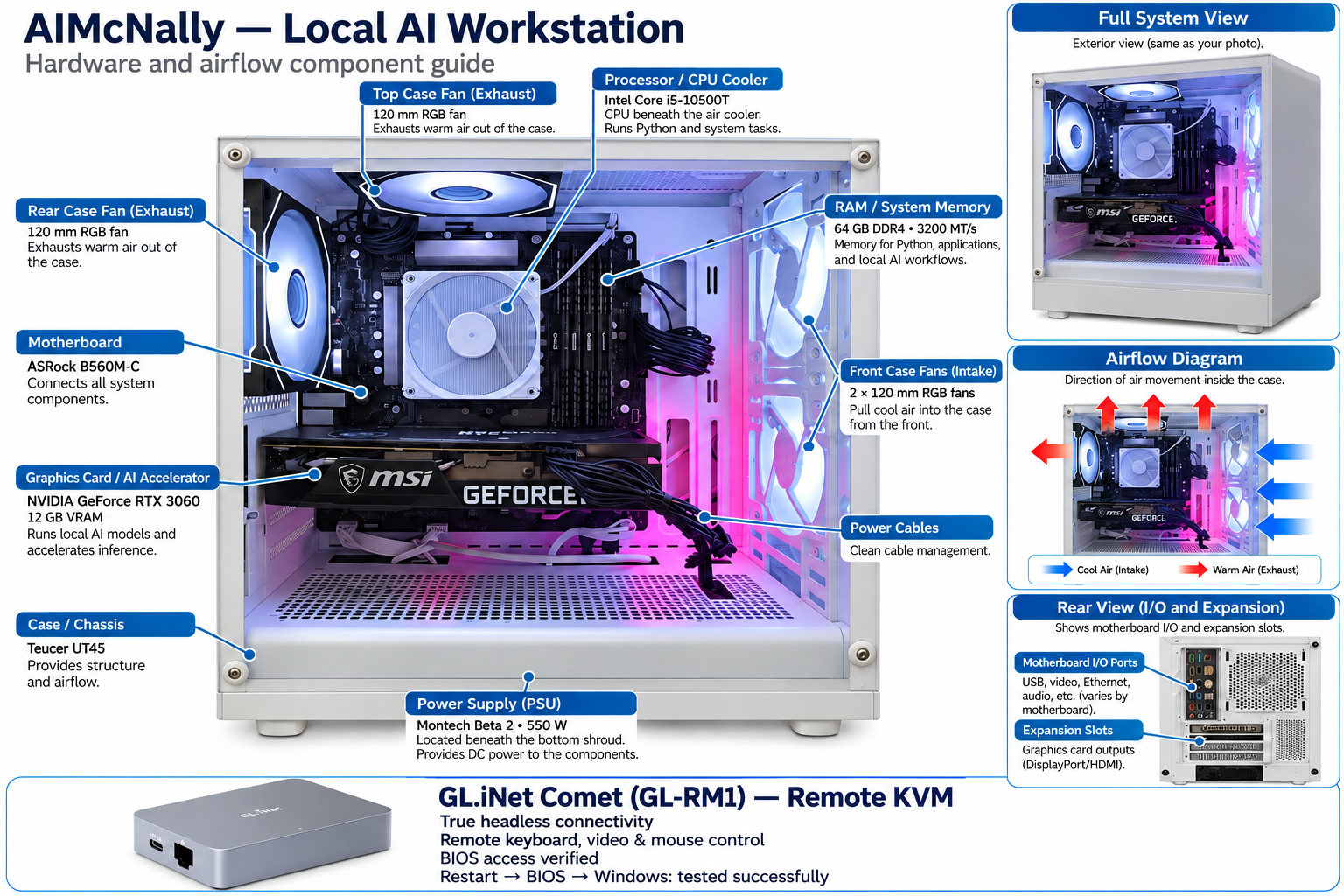
The dedicated local AI and Python workstation. Wired networking and Remote Desktop support daily administration. The GL.iNet Comet GL-RM1 now provides verified headless keyboard, video, and mouse control, including BIOS access before Windows starts. Shared transfer and staging folders connect development work to the media workflow.
A Lenovo Yoga laptop with a Ryzen 5 7535U and 16 GB RAM. It serves as the central network administration workstation and a portable management station for remote access, project work, and shared-folder access over Wi-Fi.
The main gaming and work PC: Intel Core i7-12700KF, RTX 3080 10 GB, and 32 GB DDR5. It connects by Ethernet and accesses the AI workstation and Plex shares.
A Dell Inspiron 7501 with an i7-10750H, 24 GB RAM, and GTX 1650. The media server hosts movie, television, music, and home-video libraries with Plex Pass and docked storage.
A retro gaming build with an i7-2600K, Radeon HD 5970, and Creative X-Fi Titanium. Windows 7 supports the period-focused experience; it remains offline until a local-only isolation design is verified.
The completed living-room PC uses a Ryzen 5 5500GT, GIGABYTE A520I AC motherboard, and 16 GB DDR4 at 3200 MT/s. Windows 11 supports web browsing, YouTube, and media use on the Sony A8H 4K television. HDR setup and cooling checks are complete.
RaspberryAI is the CanaKit Raspberry Pi 4 with 4 GB RAM, connected by Ethernet and running Pi-hole and Uptime Kuma in Docker. Both services are active, with successful DNS lookups, blocked-domain responses, and verified Uptime Kuma down/up alerts.
McNallyHome is using Pi-hole for DNS, with successful browsing-domain resolution, blocked-domain tests, and browser queries visible in the query log. Uptime Kuma monitors the lab, including the Comet KVM. A RaspberryAI service backup was created and copied off the Pi, with matching SHA-256 checksums confirming the copy. iPad administration through Termius is working.
Immich was intentionally removed and is not an active service. The owned M5Stack ATOM Lite ESP32 module is reserved for later IoT experiments.
The dedicated remote KVM gives AIMcNally true headless connectivity: remote keyboard, video, and mouse control independently of Windows Remote Desktop. Windows sign-in, restart, entry into BIOS, and return to Windows were successfully tested on October 21, 2026.
An HDMI connection carries video, and a USB-C-to-USB-A data cable carries keyboard and mouse control. Disabling Virtual Media resolved the USB input issue; it remains disabled in the working configuration. Remote power-on and recovery after power loss have not been tested.
A separate Intel Core i7-4770 system with 16 GB DDR3 is planned for Proxmox virtual machines, Linux administration, storage, and backups. Motherboard, case, and disk choices still need final validation. Plex will remain on the existing Dell McNally-Plex.
Ichabod is the HP t630 thin client, now running Windows 10 and connected to the network. iperf3 3.22 is installed and running, providing another endpoint for controlled LAN performance tests.
Throughput testing and the choice of its long-term administration or Linux lab role remain open. October 25 work is investigating intermittent offline availability and power settings; reliable unattended availability has not yet been confirmed.
Pi-hole filters DNS requests from clients configured to use it. McNallyHome is the confirmed pilot client: ordinary domain lookups succeeded, a test advertising domain was blocked for both IPv4 and IPv6 answers, and Chrome DNS queries appeared in the Pi-hole log. Cloudflare and Quad9 upstream DNS resolution was reported working.
This validates the pilot, rather than whole-network coverage. Remaining checks include other clients, IPv6 DNS paths, browser encrypted-DNS bypass, work/school and Plex use, and recovery if the Pi becomes unavailable. The BGW320 remains the planned sole DHCP server; broader DNS distribution requires checking its actual capabilities.
Uptime Kuma provides a central view of monitored device and service availability, including Pi-hole and the GL.iNet Comet. Down/up alerts were successfully tested, confirming notification delivery for the tested monitor.
Continue auditing monitor coverage and distinguish host reachability from application health. Verify persistence after reboot and test restoration; successful alerts and a verified backup copy do not by themselves prove full recovery.
The Pi supports the network independently of the planned Proxmox server, so server experiments need not take monitoring offline. Ethernet and Docker are operational; Pi-hole and Uptime Kuma are the active service set. A service backup has been copied off the Pi and verified with matching SHA-256 checksums. Remote administration from the iPad through Termius is working.
Pi-hole handles DNS requests sent to it; it does not inspect all network traffic or replace the gateway. Keep service administration on the trusted home network. Document service versions, persistent data, cooling and power checks, and a repeatable recovery procedure as validation continues.
The AT&T BGW320 gateway replaces the earlier gateway. The new fanless switch has arrived with eight 2.5GbE RJ45 ports and two 10Gb SFP+ ports. The existing Gigabit switch still carries the active wired network. StormTrooper and McNally-Plex currently negotiate at 1 Gbps; migration, port documentation, and endpoint throughput testing remain to be completed.
A WIMOTEK TXA092 2.5GbE PCIe adapter has been purchased for AIMcNally. Install it as part of the migration after checking slot clearance and drivers, then verify the negotiated speed. The additional M.2 PCIe storage adapter is not installed in AIMcNally.
Keep Time Capsule isolated from the internet. Validate backups and restoration for Pi-hole, Uptime Kuma, Plex metadata, and future Proxmox workloads.
Deploy the three-key and rotary-knob USB macro keypad at McNallyHome for network administration shortcuts after verifying its controller and software.
TV PC remote access and credential cleanup remain deferred until the network rework. Choose Ichabod’s final role after continued availability and network testing.
The Whole-House TV & DVR project will add an indoor multidirectional antenna and HDHomeRun tuner to Plex. Reception and the proposed Wi-Fi-extender connection still need validation.
Network and development status updated October 25, 2026, incorporating the October 24 prepared update and ongoing Ichabod availability checks. Completed work, validation in progress, and planned upgrades are labeled separately.
Questions, ideas, or a shared interest in practical AI? Reach John at john@aimcnally.com.
Email John